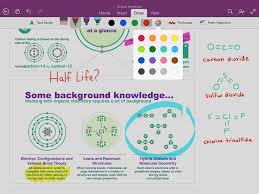
NEW YORK: Microsoft has been working on and has now brought about updates for its multi-user collaborator OneNote. Firstly, they have introduced the support for handwriting in iPad, which was long overdue considering handwriting is already available on all major platforms. Second, they have added Optical Character Recognition (OCR) which allows text search within images in the notebooks saved on OneDrive.
Microsoft said that they have been receiving the request for this feature from a long time by iPad users. To begin the handwriting feature, all you have to do is click on the ‘Draw’ tab on the ribbon. After that, you can select an instrument of your choice from pen, marker, highlighter etc. and you are good to go.
You might also like


If users are the kind of person that enjoys working with colourful text then maybe this update is exactly what they are looking for. The pen in OneNote is available in four classic colours. And if users wish for more, then tapping the colour wheel can give you 16 more colour options. One more feature that the update offers is that the pages can expand both vertically and horizontally as much as you want them to. Also, as per user’s choice, they can either zoom in or out of the page.
Now, every person has their own way of holding a pen (or in this case, a stylus) while writing and the hand in which they hold the stylus may also vary from person to person. The handwriting update has taken care of this matter too. To set up the stylus according to your comfort, all users have to do is tap the ‘Palm Rejection’ on the ribbon and tap the image that most closely resembles how user hold the pen.