
Customs Today
  • Home
  • Islamabad
  • Karachi
  • Lahore
  • National
  • Transfers and Postings
  • Chambers & Associations
  • Business
No Result
View All Result
Customs Today
  • Home
  • Islamabad
  • Karachi
  • Lahore
  • National
  • Transfers and Postings
  • Chambers & Associations
  • Business
No Result
View All Result
Customs Today
No Result
View All Result
Home Science & Technology Technology

Microsoft introduces support for handwriting in OneNote iPad, OCR

byCustoms Today Report
23/02/2015
in Technology
Share on FacebookShare on Twitter

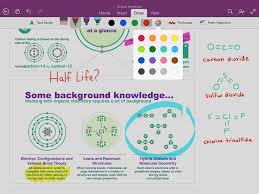
NEW YORK: Microsoft has been working on and has now brought about updates for its multi-user collaborator OneNote. Firstly, they have introduced the support for handwriting in iPad, which was long overdue considering handwriting is already available on all major platforms. Second, they have added Optical Character Recognition (OCR) which allows text search within images in the notebooks saved on OneDrive.

Microsoft said that they have been receiving the request for this feature from a long time by iPad users. To begin the handwriting feature, all you have to do is click on the ‘Draw’ tab on the ribbon. After that, you can select an instrument of your choice from pen, marker, highlighter etc. and you are good to go.


You might also like

Tesla driverless system to use updated radar technology

12/09/2016

Apple to develop its own self-driving technology

10/09/2016

If users are the kind of person that enjoys working with colourful text then maybe this update is exactly what they are looking for. The pen in OneNote is available in four classic colours. And if users wish for more, then tapping the colour wheel can give you 16 more colour options. One more feature that the update offers is that the pages can expand both vertically and horizontally as much as you want them to. Also, as per user’s choice, they can either zoom in or out of the page.

Now, every person has their own way of holding a pen (or in this case, a stylus) while writing and the hand in which they hold the stylus may also vary from person to person. The handwriting update has taken care of this matter too. To set up the stylus according to your comfort, all users have to do is tap the ‘Palm Rejection’ on the ribbon and tap the image that most closely resembles how user hold the pen.


Tags: Microsoft introduces support for handwriting in OneNote iPadOCR

Related Stories

Tesla driverless system to use updated radar technology

byCT Report
12/09/2016

WASHINGTON: Electric carmaker Tesla announced Sunday it was upgrading its Autopilot software to use more advanced radar technology. In a...

Apple to develop its own self-driving technology

byCT Report
10/09/2016

SAN FRANCISCO: Apple may not become an automaker, but it still wants to develop its own self-driving technology. The iPhone-maker's...

‘YouTubers’ outshining old-school television

byCT Report
09/08/2016

SAN FRANCISCO: A media revolution is taking place, and most people over 35 years of age aren’t tuned in. Millennial...

Google pays tribute to Edhi

byCT Report
11/07/2016

ISLAMABAD: The technology giant, Google, has paid tribute to renowned social activist, philanthropist and humanitarian Abdul Sattar Edhi by placing...

Next Post

100 finalists from 202,586 contestants include 2 Filipinos to live on Mars

  • Terms and Conditions
  • Disclaimer

© 2011 Customs Today -World's first newspaper on customs. Customs Today.

No Result
View All Result
  • Transfers and Postings
  • Latest News
  • Karachi
  • Islamabad
  • Lahore
  • National
  • Chambers & Associations
  • Business
  • About Us

© 2011 Customs Today -World's first newspaper on customs. Customs Today.