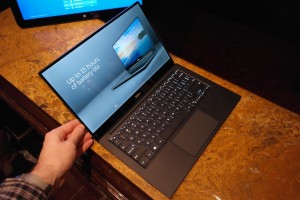
OTTAWA: Dell Canada has revealed the updated XPS 13 – a premium-looking 13.3″ ultra-thin and portable laptop.
Specs


The Dell XPS 13 is available in a number of configurations. Dell offers three configurations of the XPS 13, the unit we tested features the following specifications:
- 3″ FHD (1920×1080) display
- Intel(R) Core(TM) i5-5200U CPU @ 2.20GHz
- Intel(R) HD Graphics 5500 with 1GB RAM
- 4GB DDR3L-RS SDRAM @ 1600MHz
- 128GB SSD
- 52WHr built-in (non-replaceable by consumer) battery
- 11ac Dual Band wireless adapter, Bluetooth 4.0
- 2x USB3.0 with PowerShare, mini display port, headset jack, SD card slot
- Waves MaxxAudio Pro stereo speakers (2x1W)
- Widescreen 720p Webcam with dual array digital microphones
- Full size, back-lit chiclet keyboard and precision touchpad with seamless glass integrated buttons
- Weighs 2.6lbs (the touch version weighs 2.8lbs)
- Windows 8.1 64-bit
Design
The XPS 13 is a stunning machine. The aluminum lid and bottom is sleek looking and definitely stands out. Opening the lid and the soft-coated carbon fiber also looks sharp. The screen design stands out as well – the 5.2mm bezel is almost non-existent and is part of the reason why the XPS 13 is close to the size of most 11″ laptops. In fact, the XPS 13 is 17% smaller than the MacBook Air 13, 6% smaller than the previous XPS 13, and only slightly larger than the MacBook Air 11. The bezel also required moving the HD webcam to the lower left corner as opposed to at the top center location as it is in most laptops.
Dell-XPS-13-Review-Keyboard
The coated carbon fibre finish adds a nice look and feel to the XPS 13.
The carbon fiber palm rest is coated and very soft to the touch and the backlit keyboard is comfortable to use. I’m the first to admit that I’m not a fan of touchpads, but the precision touchpad on the XPS 13 changed my mind after a very short time of using it.
The left side of the laptop houses your power adapter connection, mini display port, a USB 3.0 with PowerShare port, headset jack, battery gauge button and indicator, and one of the two stereo speakers. The right side houses the second USB 3.0 with PowerShare port, SD card slot, and second speaker.
An interesting design choice hits the power cord as well, in addition to the traditional brick and detachable cord, Dell has provided an adapter that when plugged into the power brick directly allows you to plug the brick straight into the wall. While this does shorten the length of the power cable, it does provide a cleaner look and would work well if you were setting up the XPS 13 on a counter to charge.
Display
The 1080p screen is crisp and clear, and viewable at pretty much any angle due to the matte finish. I did find the Windows text a bit small at default settings due to the size of the screen and resolution, but that was easily fixed by upping the text size in Windows. Photos and videos also looked great and the colour seems fairly accurate.
Software/Ecosystem
The XPS 13 runs Windows 8.1 and comes with the usual pre-installed Dell apps like Backup & Recovery, My Dell, PC Checkup, McAfee LiveSafe, as well as a 20GB Dropbox bonus. You shouldn’t have any issues finding and running the applications you use on a daily basis, either.
Speakers
The stereo speakers on the laptop are pretty decent and music, games, and videos sounded ok but do lack on the bass end of the spectrum. That being said, the stereo sound was great when watching movies on the XPS 13 and are more than suitable for on the go video watching or game playing.
Camera
Even though the camera has been moved to the lower left corner as opposed to the center as in most laptops (due to the small bezel around the screen), the field of view is still good and it works well for video conferencing.
Battery Life
Dell claims the i5 FHD version lasts between 13 and 15 hours on a single charge. During my use performing various tasks including web surfing, document editing, video watching and photo editing and I was able to get around 11 hours use with about 10% battery left. With that kind of battery life, you can easily get away with using this laptop throughout the day without having to worry about looking for a place to plug in.
Accessories
While we didn’t get to test any of the accessories available for the XPS 13 line, Dell has an abundance of additional accessories to extend the use and functionality of your laptop. Even though the XPS 13 has superb battery life, the Dell Power Companion is a 12,000 mAh portable power solution which lets you power and charge your XPS 13, phone, and tablets while on the go. As mentioned above, the laptop is missing both HDMI and ethernet ports. While I would have liked to see an HDMI port instead of the DisplayPort, it would have been even nicer to see an included ethernet port. In order to get around this, you can pick up a Dell Adapter which uses one of your USB 3.0 ports to connect to an HDMI, VGA, or ethernet cable and even includes a USB 2.0 port so you’re not down one while the adapter is connected. Of course, this is something to consider if you use HDMI or ethernet frequently as this will add a bit of cost to the purchase price. In addition to those to key accessories, you can also pick up a docking station, ultra-slim slot DVD/CD drive, spare 45W power adapter, and various bags or sleeves to protect and transport your laptop.
Price/Value
The XPS 13 can run you between $799-$1599USD ($899-$1899CAD) depending on processor and whether you get the touch screen or not, and our review unit falls into the $899USD ($1099CAD) range. While that might seem a bit steep for a 13″ laptop, it is ultra-portable and when compared to other laptops in the same class is pretty reasonable.