NEW YORK: Dell introduced one of the most exciting and horribly named Android tablets in September ever made the Venue 8 7000. Now, that awesome slate is getting a big brother.
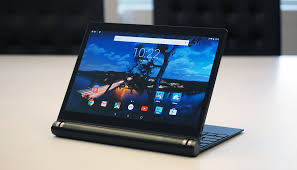
The Dell Venue 10 7000 (still a dumb name) is a $US500 10.5-inch tab running Android Lollipop. It’s sleek and slim and black, just like its predecessor. It houses the same Intel Atom processor, the same 2GB of RAM, and a similarly gorgeous 2560 x 1600 OLED display. By all counts, it’s just a super-sized version of Dell’s latest and greatest except for one important detail.


It’s packed with a 7000mAh battery for an estimated 7 hours of juice, dual MaxxAudio speakers, and a pair of latches like you has never seen before latches that let you attach a $US130 optional keyboard to transform this slab of a device into a Optimus Prime-like 5-in-1.
You’re really going to want keyboard. For one, the knob is the only way to really hold this thing. (Anything else is awkward because of the added weight.) But you’ll also want the keyboard because it’s real nice, like “better than the Surface Pro 3″ levels of terrific. The keys are click and backlit, the latches are easy to connect and disconnect, and the keyboard dock never obscures the speakers in any mode.
The Venue 10 7000 also sticks with Intel’s RealSense depth camera module, a fancy set of three cameras that work together to perform cool post-processing tricks like refocusing images after the fact, or estimating the length or height of an object.
Just don’t expect them to be particularly good pictures: the original tablet’s RealSense cameras didn’t exactly take stellar photos.
Dell keeps things simple on the OS front, running a near-stock Android Lollipop with only a few apps to make use of Dell’s cameras and other services like Dell Cast which lets you mirror your tablet screen to a TV if you’ve also got a Miracast dongle lying around.
For $US650, you could buy a new Surface 3. For under $US500, you can find capable transforming touchscreen machines like the Acer Switch 11, Asus Transformer Book T100, and Dell’s own Inspiron 11 3000. All of those can run full Windows applications without having to deal with a mobile-first OS. And if you don’t need a touchscreen or Windows, you can go even cheaper the $US200 HP Stream 11 is great in a pinch, and Chromebooks start at just $US150 now.