Customs Today
  • Home
  • Islamabad
  • Karachi
  • Lahore
  • National
  • Transfers and Postings
  • Chambers & Associations
  • Business
No Result
View All Result
Customs Today
  • Home
  • Islamabad
  • Karachi
  • Lahore
  • National
  • Transfers and Postings
  • Chambers & Associations
  • Business
No Result
View All Result
Customs Today
No Result
View All Result
Home Science & Technology Technology

New firmware leaks android 5.0.1 lollipop for Samsung galaxy S4 GT-I9500 in China

byCustoms Today Report
23/01/2015
in Technology
Share on FacebookShare on Twitter

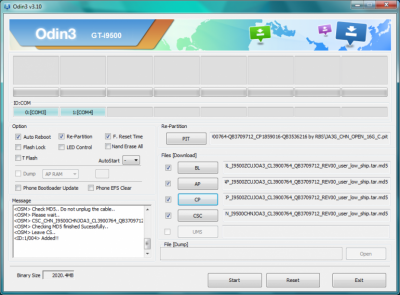
BEIJING: Samsung is yet to officially roll out the Android 5.0.1 update for the Galaxy S4, the new firmware, recently leaked in China, can provide the latest Lollipop OS experience to the users of the GT-I9500. To update the handset to the latest version of Android, users need to flash the firmware file — I9500ZCUJOA3 — using Odin as over-the-air and KIES updates are currently not available.

Some points to note before installing:-

You might also like

Tesla driverless system to use updated radar technology

12/09/2016

Apple to develop its own self-driving technology

10/09/2016
  • Users must ensure proper backup of personal data on the handset
  • The device should have at least 80 percent of battery power
  • USB drivers for the Galaxy S4 must be installed on the computer
  • USB debugging must be enabled on the phone
  • Make sure that the device is a Samsung Galaxy S4 with the model number GT-I9500

Note: International Business Times cannot be held responsible if anything goes wrong. Users should proceed at their own risk.

Follow the steps:-

Step 1: Download the firmware package and extract the zip file.

Step 2: Download Odin and extract the zip file. There will be an Odin3 v3.10.6.exe along with few other files.

Step 3: Run Odin3 v3.10.6.exe as an Administrator.

Step 4: Boot the Galaxy S4 into Download Mode by pressing and holding Volume Down, Home and Power buttons together. After a warning message appears, press Volume Up button to enter Download Mode.

Step 5: Connect the Galaxy S4 to the computer via the USB cable and wait until an “Added!!” message appears in bottom left box in Odin.

Step 7: In Odin, ensure that only the “Auto Reboot” and “F. Reset Time” options are checked, while the “Re-Partition” option is disabled.

Step 8: Click on the Start button in Odin to begin flashing.

Step 9: After the process is complete, a “PASS!” message will appear in ID:COM port with green background and the device will automatically restart.

Step 10: Once you see the Samsung logo on the device’s home screen, unplug the device from the computer.


Tags: New firmware leaks android 5.0.1 lollipop for Samsung galaxy S4 GT-I9500 in China

Related Stories

Tesla driverless system to use updated radar technology

byCT Report
12/09/2016

WASHINGTON: Electric carmaker Tesla announced Sunday it was upgrading its Autopilot software to use more advanced radar technology. In a...

Apple to develop its own self-driving technology

byCT Report
10/09/2016

SAN FRANCISCO: Apple may not become an automaker, but it still wants to develop its own self-driving technology. The iPhone-maker's...

‘YouTubers’ outshining old-school television

byCT Report
09/08/2016

SAN FRANCISCO: A media revolution is taking place, and most people over 35 years of age aren’t tuned in. Millennial...

Google pays tribute to Edhi

byCT Report
11/07/2016

ISLAMABAD: The technology giant, Google, has paid tribute to renowned social activist, philanthropist and humanitarian Abdul Sattar Edhi by placing...

Next Post

PHC issues stay order against collection of four surcharges on electricity bills

  • Terms and Conditions
  • Disclaimer

© 2011 Customs Today -World's first newspaper on customs. Customs Today.

No Result
View All Result
  • Transfers and Postings
  • Latest News
  • Karachi
  • Islamabad
  • Lahore
  • National
  • Chambers & Associations
  • Business
  • About Us

© 2011 Customs Today -World's first newspaper on customs. Customs Today.