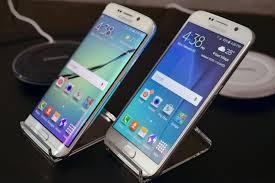
MELBOURNE: Samsung has added two new flagship smartphones in its Galaxy line up, Galaxy S6 and Galaxy S6 Edge. Samsung’s Galaxy S6 is just like as its predecessor Galaxy S5. While the Galaxy S6 Edge is essentially the same phone with an added curve to its display that makes it even more striking.
On paper and in pictures, the Edge seems like the phone to own. But after using it alongside the regular S6 for the past several days, I’m not convinced it is.
You might also like

The Galaxy S6 Edge costs about $100 more than the regular Galaxy S6, both on contract and outright. Depending on where you buy it and what type of payment plan you select, you’re looking at $300 with a two-year contract or $700 to $815 outright for the base 32GB model.
A clash of form and function
In the simplest possible terms, the Galaxy S6 Edge is a Galaxy S6 whose screen slopes subtly over on both sides instead of laying flat. That creates a cool visual effect and is a wonderful technological demonstration — but practically speaking, it doesn’t add much value and actually makes the phone harder to use.
The problem is that the form doesn’t match the function. First of all, the Edge’s sloped screen eliminates much of the phone’s frame — leaving you with a small and sharper-feeling perimeter that’s harder to grab and less comfortable in the hand than the regular Galaxy S6 model.
Then there’s the issue of interacting with the phone: When you’re looking at text on the Edge, parts of words frequently fall along the curved areas of the glass and end up being more difficult to read than if they were on a regular flat surface. The same sort of effect happens with photos and videos.
And it’s not just a visual problem: The Edge also makes tapping and typing on the phone more challenging. Buttons and keys stretch over onto the sloped sections of the screen, where pressing them becomes awkward. It’s most apparent when you’re using the phone’s on-screen keyboard; with parts of some letters sitting on a slope, inputting text is quite unnatural and unnecessarily laborious.
Perks that fall flat
Samsung does provide a handful of supplementary features specific to the Edge’s hardware, but the features feel like a stretch — like Samsung was really struggling to come up with a way to justify the curved screen’s existence. That’s a contrast from last year’s Galaxy Note Edge phone, where the curved part of the display was limited to one side of the device and thus significantly larger, allowing for more robust and relevant functionality.
On the S6 Edge, the only feature present when the screen is on is the ability to swipe over from the edge of the display to see a stack of starred contacts on your home screen. You can then view any missed notifications from those contacts or tap any of their faces to call, text or email them directly. It’s nothing you couldn’t accomplish with any number of widgets — or, heck, even with the same exact setup on a traditional phone. (The curve itself really has nothing to do with the feature’s execution.)
While the Edge’s screen is off, you can swipe along the curved part of the screen to activate a tiny bar that shows your current notifications and optionally news or weather information. It’s a weird way to consume that kind of content when you could more quickly turn your screen on all the way and see the same info in an easier-to-read format.
Finally, the Edge can show the time in a tiny side-of-screen bar while the display is off — and if you want to keep your phone face-down on a table, it can light up the curved part of the screen to create a “glow” effect that lets you know when you have a missed call or message. It’s hard to think of a scenario where either option would be particularly useful.