Customs Today
  • Home
  • Islamabad
  • Karachi
  • Lahore
  • National
  • Transfers and Postings
  • Chambers & Associations
  • Business
No Result
View All Result
Customs Today
  • Home
  • Islamabad
  • Karachi
  • Lahore
  • National
  • Transfers and Postings
  • Chambers & Associations
  • Business
No Result
View All Result
Customs Today
No Result
View All Result
Home Science & Technology Technology

WhatsMApp Solo allows you to use two WhatsApp accounts on same device

byCustoms Today Report
05/05/2015
in Technology
Share on FacebookShare on Twitter

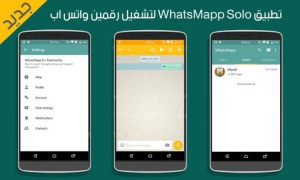
LONDON: A new WhatsMApp Solo version has been introduced which will surely make you uninstall OGWhatsApp (in case you are using it).

WhatsMApp Solo is an application that will allow you to use two WhatsApp accounts on the same device, at the same time. All you have to do is setup a WhatsApp account on WhatsMApp Solo and another WhatsApp account on the official WhatsApp application. This way, you will be able to run both of the applications at the same time and use the two WhatsApp accounts on the same device without any problems.


You might also like

Tesla driverless system to use updated radar technology

12/09/2016

Apple to develop its own self-driving technology

10/09/2016

Why WhatsMApp Solo?

There are a lot of users who ask themselves: “Why would I use two WhatsApp accounts?” Well, as you can already see, there are a lot of mobile devices nowadays that support dual-SIM. That means that you probably want to use both of the WhatsApp accounts and you can’t do that by using only the official WhatsApp application.

At the same time, there are people who have two mobile devices, but one of the devices doesn’t support WhatsApp. Or the same people want to use only one device to write WhatsApp messages.

This is when WhatsMApp Solo kicks in and helps you keep two WhatsApp accounts on the same device without any problems. WhatsMApp comes with a custom icon and color, which makes you easy to understand which one is the official application and which one is the modded one.

Installing WhatsMApp Solo version 2.12.45 APK on Android

Installing the official WhatsApp application, chat with anyone and make a backup. After that, uninstall the official WhatsApp application and install WhatsMApp Solo 2.12.45 APK and restore the chats.

After that, install back the official WhatsApp application and you will notice that you can use two WhatsApp accounts at the same time.

HINT: Don’t forget to enable Unknown Sources option, as it allows you to install “unofficial” applications. This option can be found on either Settings->Applications or Settings->Security (depends on the Android version your device is running on).




Related Stories

Tesla driverless system to use updated radar technology

byCT Report
12/09/2016

WASHINGTON: Electric carmaker Tesla announced Sunday it was upgrading its Autopilot software to use more advanced radar technology. In a...

Apple to develop its own self-driving technology

byCT Report
10/09/2016

SAN FRANCISCO: Apple may not become an automaker, but it still wants to develop its own self-driving technology. The iPhone-maker's...

‘YouTubers’ outshining old-school television

byCT Report
09/08/2016

SAN FRANCISCO: A media revolution is taking place, and most people over 35 years of age aren’t tuned in. Millennial...

Google pays tribute to Edhi

byCT Report
11/07/2016

ISLAMABAD: The technology giant, Google, has paid tribute to renowned social activist, philanthropist and humanitarian Abdul Sattar Edhi by placing...

Next Post

Market stats expected to reflect low inflation

  • Terms and Conditions
  • Disclaimer

© 2011 Customs Today -World's first newspaper on customs. Customs Today.

No Result
View All Result
  • Transfers and Postings
  • Latest News
  • Karachi
  • Islamabad
  • Lahore
  • National
  • Chambers & Associations
  • Business
  • About Us

© 2011 Customs Today -World's first newspaper on customs. Customs Today.